
How to update Manual ? Here
How to update via ADB sideload ? Here
ZENFONE 5 firmware:
Version WW_user_1.17.40.16
| Description | ASUS ZenFone 5(T00F/T00J) software Image: V1.17.40.16 for WW SKU only* Improvement Item: 1. Brand-new skin-brightening feature added to the Beautification mode, enabling even better- looking selfies. 2. Adding two additional resolution options, 3M/2M, for real cameras. 3. Adjust front cam skin tone 4. Support OTG function 5. Support Asus unlock APP 6. Enhance 3rd party app compatibility 7. Improved system stability (modem) Steps of Update: 1. Check software version of your device** 2. Download device software and Update SOP (From �Manual� Item) 3. Only apply to same SKU update, Example: WW->WW, CN->CN, TW->TW. 4. Software update cannot transfer the software SKU and downgrade the software version. 5. Wrong SKU may cause update failure, please update the same SKU version only. *How to know the device model? Path: Settings->About-> Model number Example: ASUS_T00I **How to know the device software version? Path: Settings->About-> software information->Build number ***System upgrade may cause part of data missing, please buckup your important data before system upgrading. |
|---|
| File Size | 675 MBytes update 2014/08/17 |
|---|---|
| Download from | Global |
Version CN_user_1.17.40.17
| Description | ASUS ZenFone 5(T00F/T00J) software Image: V1.17.40.16 for CN SKU only* Improvement Item: 1. Brand-new skin-brightening feature added to the Beautification mode, enabling even better- looking selfies. 2. Adding two additional resolution options, 3M/2M, for real cameras. 3. Adjust front cam skin tone 4. Support OTG function 5. Support Asus unlock APP 6. Enhance 3rd party app compatibility 7. Improved system stability (modem) Steps of Update: 1. Check software version of your device** 2. Download device software and Update SOP (From �Manual� Item) 3. Only apply to same SKU update, Example: WW->WW, CN->CN, TW->TW. 4. Software update cannot transfer the software SKU and downgrade the software version. 5. Wrong SKU may cause update failure, please update the same SKU version only. *How to know the device model? Path: Settings->About-> Model number Example: ASUS_T00I **How to know the device software version? Path: Settings->About-> software information->Build number ***System upgrade may cause part of data missing, please buckup your important data before system upgrading. |
|---|
| File Size | 675 MBytes update 2014/08/17 |
|---|---|
| Download from | Global |
Version TW_user_1.17.40.16
| Description | ASUS ZenFone 5(T00F/T00J) software Image: V1.17.40.16 for TW SKU only* Improvement Item: 1. Brand-new skin-brightening feature added to the Beautification mode, enabling even better- looking selfies. 2. Adding two additional resolution options, 3M/2M, for real cameras. 3. Adjust front cam skin tone 4. Support OTG function 5. Support Asus unlock APP 6. Enhance 3rd party app compatibility 7. Improved system stability (modem) Steps of Update: 1. Check software version of your device** 2. Download device software and Update SOP (From �Manual� Item) 3. Only apply to same SKU update, Example: WW->WW, CN->CN, TW->TW. 4. Software update cannot transfer the software SKU and downgrade the software version. 5. Wrong SKU may cause update failure, please update the same SKU version only. *How to know the device model? Path: Settings->About-> Model number Example: ASUS_T00I **How to know the device software version? Path: Settings->About-> software information->Build number ***System upgrade may cause part of data missing, please buckup your important data before system upgrading. |
|---|
| File Size | 675 MBytes update 2014/08/17 |
|---|---|
| Download from | Global |
Version CHT_user_1.17.40.16
| Description | ASUS ZenFone 5(T00F/T00J) software Image: V1.17.40.16 for CHT SKU only* Improvement Item: 1. Brand-new skin-brightening feature added to the Beautification mode, enabling even better- looking selfies. 2. Adding two additional resolution options, 3M/2M, for real cameras. 3. Adjust front cam skin tone 4. Support OTG function 5. Support Asus unlock APP 6. Enhance 3rd party app compatibility 7. Improved system stability (modem) Steps of Update: 1. Check software version of your device** 2. Download device software and Update SOP (From �Manual� Item) 3. Only apply to same SKU update, Example: WW->WW, CN->CN, TW->TW. 4. Software update cannot transfer the software SKU and downgrade the software version. 5. Wrong SKU may cause update failure, please update the same SKU version only. *How to know the device model? Path: Settings->About-> Model number Example: ASUS_T00I **How to know the device software version? Path: Settings->About-> software information->Build number ***System upgrade may cause part of data missing, please buckup your important data before system upgrading. |
|---|
| File Size | 675 MBytes update 2014/08/17 |
|---|---|
| Download from | Global |
Version CUCC_user_1.17.40.16
| Description | ASUS ZenFone 5(T00F/T00J) software Image: V1.17.40.16 for CUCC SKU only* Improvement Item: 1. Brand-new skin-brightening feature added to the Beautification mode, enabling even better- looking selfies. 2. Adding two additional resolution options, 3M/2M, for real cameras. 3. Adjust front cam skin tone 4. Support OTG function 5. Support Asus unlock APP 6. Enhance 3rd party app compatibility 7. Improved system stability (modem) Steps of Update: 1. Check software version of your device** 2. Download device software and Update SOP (From �Manual� Item) 3. Only apply to same SKU update, Example: WW->WW, CN->CN, TW->TW. 4. Software update cannot transfer the software SKU and downgrade the software version. 5. Wrong SKU may cause update failure, please update the same SKU version only. *How to know the device model? Path: Settings->About-> Model number Example: ASUS_T00I **How to know the device software version? Path: Settings->About-> software information->Build number ***System upgrade may cause part of data missing, please buckup your important data before system upgrading. |
|---|
| File Size | 675 MBytes update 2014/08/17 |
|---|---|
| Download from | Global |
Ricky Febrian Agustus 19, 2014 New Google SEO Bandung, Indonesia

Tutorial How to Lock 3G signal or HSDPA only on Zenfone 5/6 :
- Go to Phone

- Type *#*#4636#*#*
- Choose Phone Information

- Choose WCDMA Only


Credit to mobilecity.vn
====================================================================
Do it With Your Own Risks
SpihnX for Zenfone 5 v1.0
Changelogs:
- Build on the WW
- Optimize system with integrated tweaks
- Removing unnecessary apps
- Optional speed switching network
- Asked toggle switch Option at startup data
- Options toggle drag the lock screen status bar
- Function toggle options open screen by Volume
- Any option to disable click to lock screen clock
- RootExpoler
- Add Laban key keyboard to type Vietnamese
Download: SphinX-V1.0-ZenfoneA501.rar
====================================================================
Installation Instructions :
- Zenfone 5 with WW/CN/TW t00f/tooj
- Root
- Download ROM above and extract to a folder
- Turn On USB Debugging (Settings>About>Software Information, Tap 7 times and go to settings > developer options> check USB debugging)
- Connect Zenfone 5 to Computer/Laptop
- Copy unzipped/downloaded SphinX ROM to phone memory (internal)
- On the computer (extracted ROM Folder SphinX-V1.0-ZenfoneA501) run Flash_Sphinx.bat)
- Grant SuperSU, click allow
- Wait, about 5-10 minutes until complete
- Go to Recovery (Power + Volume up)
- Wipe Factorey data, Wipe Cache, Reboot System
- Done


Ricky Febrian Agustus 03, 2014 New Google SEO Bandung, Indonesia


Do it With Your Own Risk..
Install with computer/laptop and Rooted Zenfone 5:
- Download CWM-Recovery for Zenfone 5 Here
- Install ADB Here
- Download ADB Tool Here
- Unzip and copy to the same folder
- Enable USB Debugging
- Connect Zenfone 5 to PC/Laptop
- Run the install.bat file (file in folder) pending reboot is OK
So you've finished installing CWM ClockworkMod recovery for Zenfone 5 - How to Enter cwm : 1 Turn off the machine
2 Press the power + Volume -down
3 Wait a moment it will enter Recovery
Ricky Febrian Juli 30, 2014 New Google SEO Bandung, Indonesia


Credit to :
- http://www.asus.com/zentalk/tw/forum.php?mod=viewthread&tid=43868&extra
- https://www.facebook.com/notes/official-lounge-asus-zenfone-5/share-twrp-recovery-untuk-zenfone-5/708675175864666
Install via ADB:
- Zenfone 5 have root. (T00F and T00J were used)
- Download twrp and extract:
Dropbox: https://dl.dropboxusercontent.com/u/8089/ZenFoneTools/zenfone_5_twrp_installer.zip - Download ADB here and extract at the same folder as step 2
- Download Platform-tools and extract to the sam folder too http://d-h.st/ZN2
- Activate USB Debugging (How? Here)
- Connect Zenfone 5 with computer/laptop
- Double-click install.bat file (remember to allow SuperSU for adb).
- Wait bootable zenfone is Done !!!
Install Manually via Root Explorer :
rename file /system/recovery-from-boot.p to recovery-from-boot.bak
Enter TWRP => enter booting press vol down while red led.
D.W.Y.O.R
Bugs:
- unresponsive touch
Ricky Febrian Juli 30, 2014 New Google SEO Bandung, Indonesia


- Go to Here (Driver and Tools > OS Android and Download the lastest version of WW ROM same with your zenfone 5 type T00J/T00F)
- After download done, extract file, you will receive a zip file. Rename zip file to:
- If current rom is TW: rename zip file to UL-ASUS_T00F-TW-2014.3.27.935705-user.zip
- If current rom is CN: rename zip file to UL-ASUS_T00F-CN-10000.11.40.1-user.zip
- Wipe Data (tutorial Here)
- Copy ROM ZIP file to the root directory of phone memory ( that is placed directly under the root directory of the phone not on any folder ) , remember not to decompress
- Un plug your cable, (may be wait about 30s) => you will receive update notification. Touch it to update :)
- make Sure your zenfone > 20% energy (or you should charge your phone). If not, may be you will not receive any update notification
- After up other rom (your zenfone is CN up to WW rom, TW up to WW or CN up to TW rom) your zenfone will not update through OTA :( (to update, you must go to asus download center to download and manual update)
If error/can't change to WW : Follow this step

Top-down M8 / ZENFONE 5 / red rice, with maximum brightness :

.jpg)

Source: http://www.mobile01.com/topicdetail.php?f=588&t=3948470&last=50629014 Ricky Febrian Juni 14, 2014 New Google SEO Bandung, Indonesia

ZF5 official website specifications support to 64GB SD card
SanDisk 128GB [30MB / s] microSDXC mobile ultra UHS-1 C10 memory card plugged ZF 5.
Successfully read - with A1 SD Benchmark test read 21.85MB / s write 13.59MB / S


Source: http://www.mobile01.com/topicdetail.php?f=588&t=3944938&r=2&last=50577124 Ricky Febrian Juni 12, 2014 New Google SEO Bandung, Indonesia


Asus Zenfone 5 4G LTE first look At Computex 2014 Taipei International Computer Show. ASUS ZenFone 5 A500KL with a 5-inch HD IPS screen, powered by Qualcomm Snapdragon 400 MSM8926, 1.2GHz quad-core processor, 2GB RAM, 4G LTE support Taiwan's full-band (B3 / B8 / B28). Benchmark soon..
Ricky Febrian
Juni 03, 2014
New Google SEO
Bandung, Indonesia

Vietnamese Asus Zenfone 5 with 2GB ram playing asphalt 8
Credit to Uploader

Complete Camera comparison asus zenfone 5 vs iPhone 5s
FRONT CAMERA SELF TIMER
Ricky Febrian
April 26, 2014
New Google SEO
Bandung, Indonesia
OUTDOOR PHOTOS
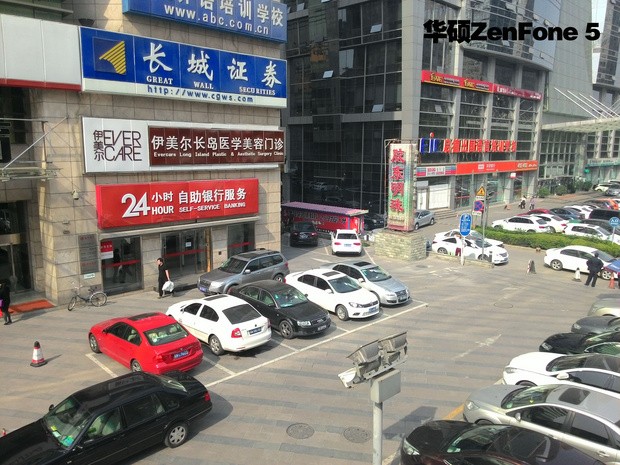 |
| Zenfone 5 |
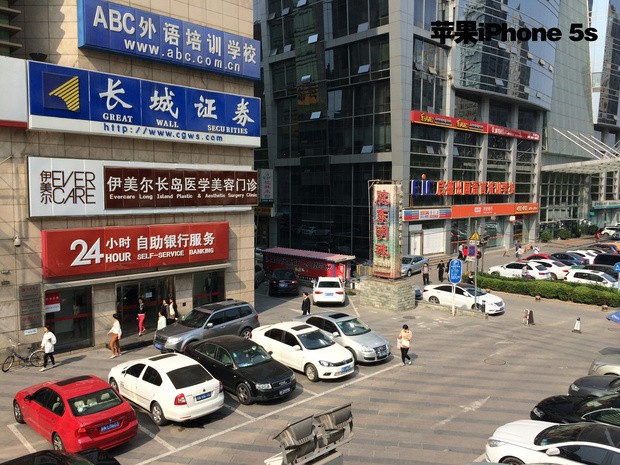 |
| iPhone 5S |
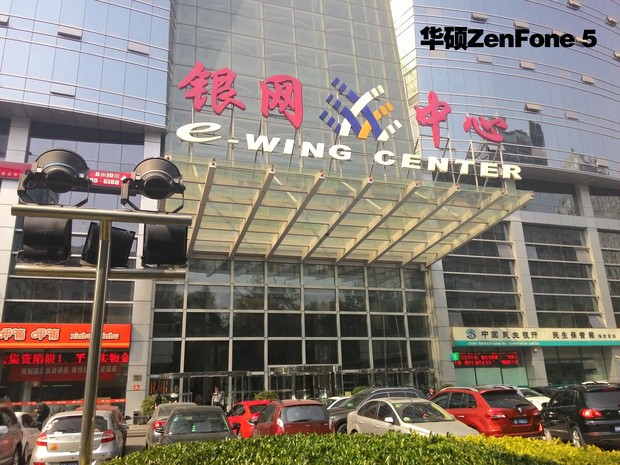 |
| Zenfone 5 |
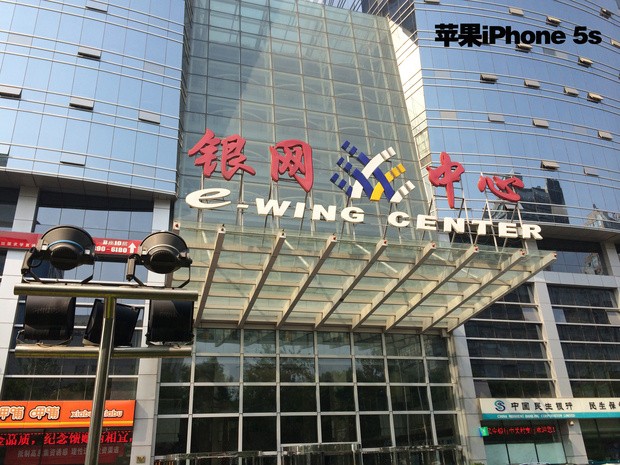 |
| iPhone 5S |
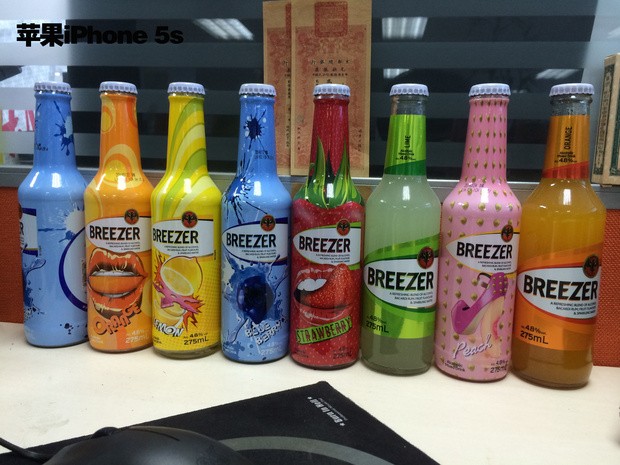
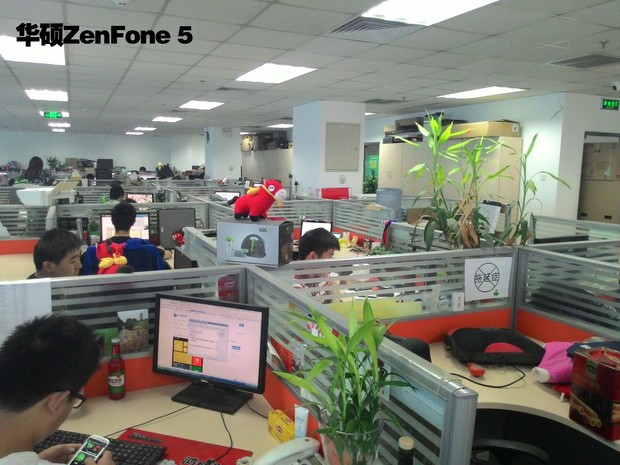
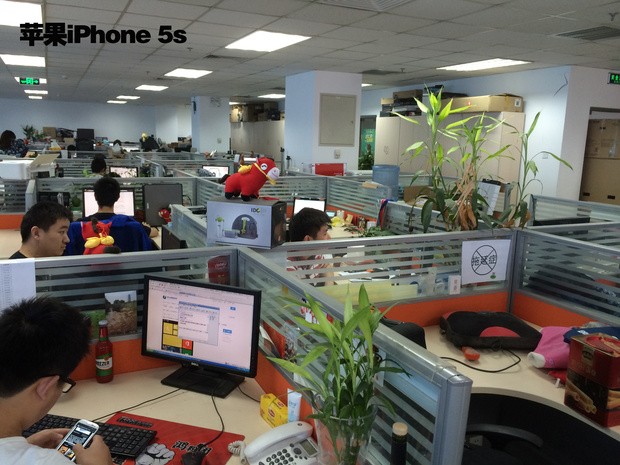
INTERIOR PHOTOS
 |
| Zenfone 5 |
 |
| iPhone 5S |
 |
| Zenfone 5 |
 |
| iPhone 5S |
HDR PHOTOS
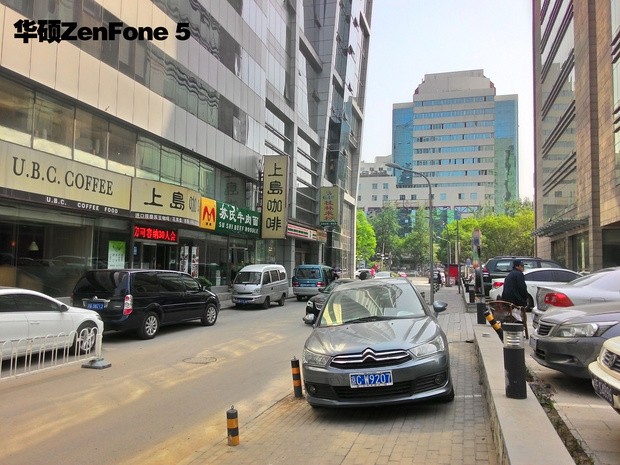 |
| Zenfone 5 |
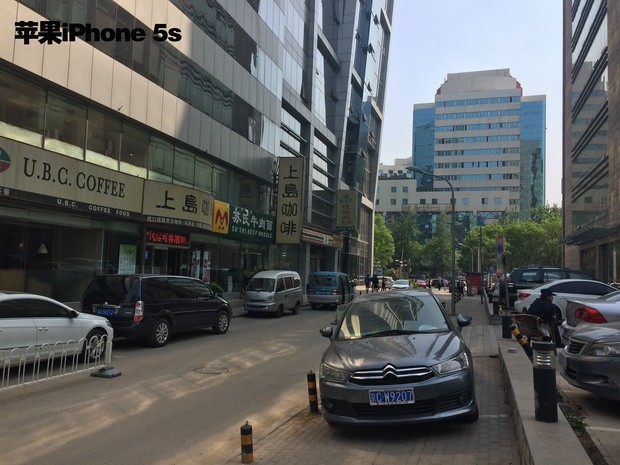 |
| iPhone 5S |
MACRO PHOTOS
 |
| Zenfone 5 |
 |
| iPhone 5S |
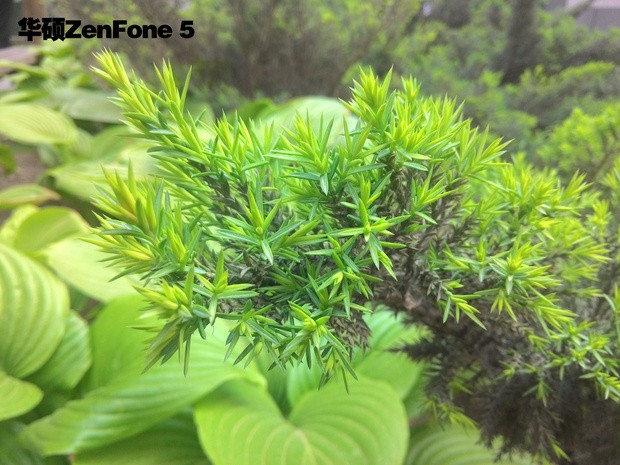 |
| Zenfone 5 |
 |
| iPhone 5S |
NIGHT AND LOW LIGHT PHOTOS
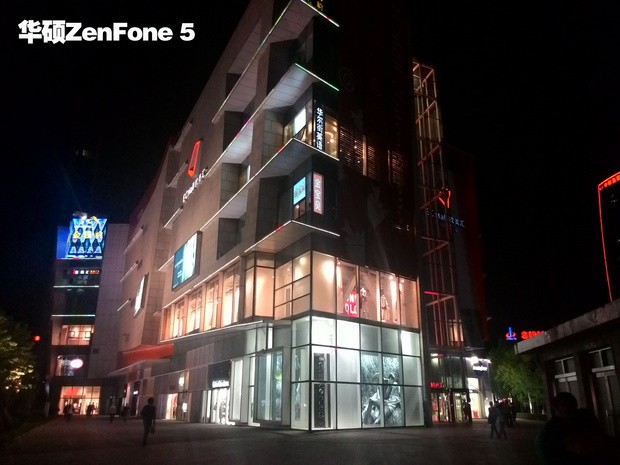 |
| Zenfone 5 |
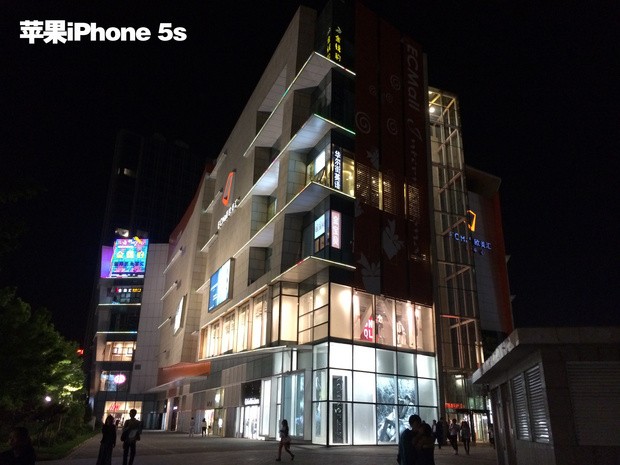 |
| iPhone 5S |
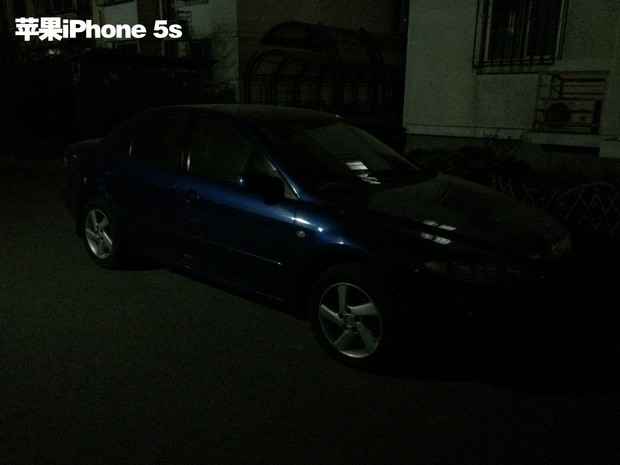 |
| iPhone 5S |
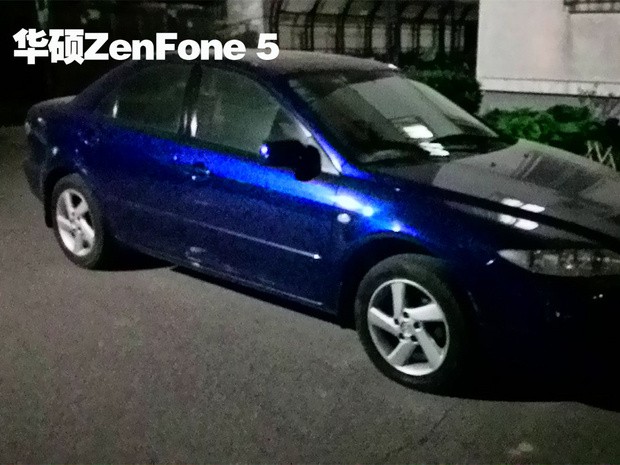 |
| Zenfone 5 |
FRONT CAMERA SELF TIMER
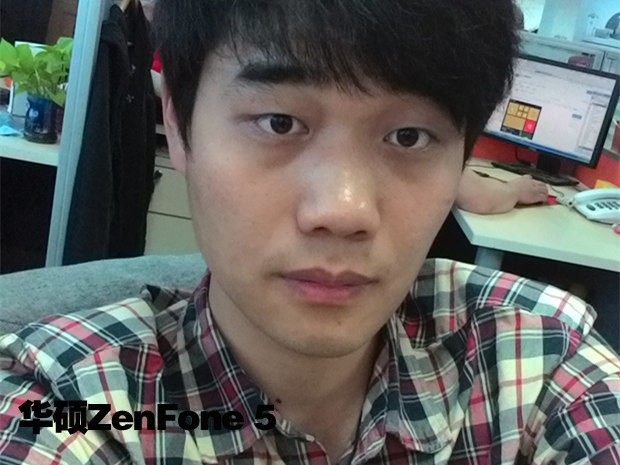 |
| Zenfone 5 |
 | |
| iPhone 5S |
Today i'll show you the camera battle between zenfone 5 , xperia s and Sony Nex2N.
Ricky Febrian April 17, 2014 New Google SEO Bandung, Indonesia
 |
| Zenfone 5 |
 |
| Sony Nex2N |
 |
| Xperia S |
 |
| Zenfone 5 |
 |
| Sony Nex2N |
 |
| Xperia S |
 |
| Zenfone 5 |
 |
| Sony Nex2N |
 |
| Xperia S |
 |
| Zenfone 5 |
 |
| Sony Nex2N |
 |
| Zenfone 5 |
 |
| Sony Nex2N |
 |
| Xperia S |
 |
| Zenfone 5 |
 |
| Sony Nex2N |
Ricky Febrian April 17, 2014 New Google SEO Bandung, Indonesia


